1. Export a CSV marker file from Frame.io
Export comments from Frame.io in the video comments menu "Download to File" > "CSV".
2. Use the "マーカコンバーター" to convert the CSV marker file into a CSV file
Open the free マーカコンバーター, select "Frame.io > Comments (.csv)" and set "convert" to "CSV for Google Sheets". Generate and download the file. ファイルの変換で問題が発生した場合は、無料のサポートにお問い合わせいただけます。
3. Import the CSV file into Google Sheets
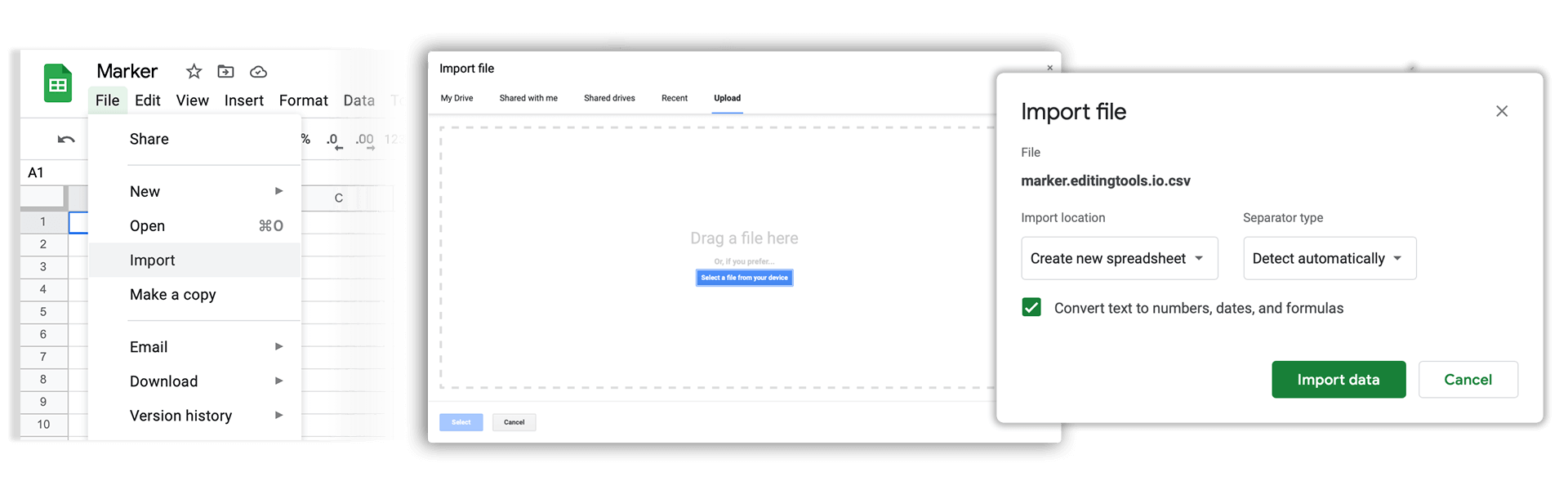
Open Google Sheets and go to "File -> Import". Upload the generated CSV file and press "Import Data" to generate the Sheet with all markers.
🚀 完了
以上です!このチュートリアルが役に立ったら、ぜひシェアして応援してください。ワークフローの改善案があれば、ぜひお知らせください!